
1 in 4 Response Actions Is Now Automated: What SOAR Means for Your 3 AM Incident
When a security alert arrives at 3 AM, detection is only the beginning. The next question is whether your monitoring provider can take an authorized containment action quickly, or whether the alert waits for someone to read a ticket, find the right contact and decide what to do.
SOAR (security orchestration, automation and response) helps connect detection to action. It can coordinate routine, pre-approved steps across security tools, while analysts investigate and make the judgment calls that shouldn’t be left to a script.
One recent statistic deserves context. N-able’s 2026 State of the SOC report says SOAR-orchestrated actions accounted for almost one in four responses in its SOC’s measurement period. That finding is based on N-able’s own SOC and Adlumin MDR telemetry. More than 900,000 alerts observed from March through December 2025. It is not a representative estimate of every SOC or every organization. The result is still a useful signal: automation is becoming a practical part of modern security operations.
SOAR IN PLAIN LANGUAGE: FROM ALERT TO COORDINATED ACTION
A SIEM collects and analyzes security data, then generates alerts when activity looks suspicious. SOAR connects those alerts to workflows, often called playbooks, that can gather context, notify the right people and, when authorized, trigger actions in connected tools.
A playbook might:
- Receive a high-confidence alert from endpoint monitoring.
- Check the affected device, user and alert details.
- Enrich the event with information from other security tools.
- Isolate a device or block a known malicious indicator if policy allows.
- Open an incident ticket with the evidence and actions attached.
- Notify an analyst or customer contact when human review is required.

The value is not simply that a machine can work faster than a person. It is that a well-designed, authorized playbook can take the same defined steps consistently, preserve a record of what happened and give analysts a clear starting point for investigation.
THE 3 AM DIFFERENCE: MINUTES FOR ROUTINE CONTAINMENT, HUMAN REVIEW FOR JUDGMENT
Imagine an endpoint triggers a high-confidence alert for malicious activity outside business hours. Depending on the provider’s tools, integrations and agreed authority, a response workflow could isolate the endpoint, add relevant evidence to a case and alert the on-call analyst.
That can reduce the time between confirmation and containment. It does not mean every response is automatic, or that every provider can perform every action in every environment. Capabilities depend on what systems are connected, how they are configured and what authority the organization has granted.
Possible response actions across a security environment may include:
- Isolating a compromised endpoint from the network.
- Blocking a confirmed malicious domain, IP address or file indicator.
- Disabling an account or revoking active sessions or tokens.
- Creating an incident ticket and notifying the designated contacts.
Actions such as account disablement or session revocation should be explicitly scoped and tested before they are put into an automated workflow. They may disrupt legitimate work, and their availability depends on integrations and access permissions.
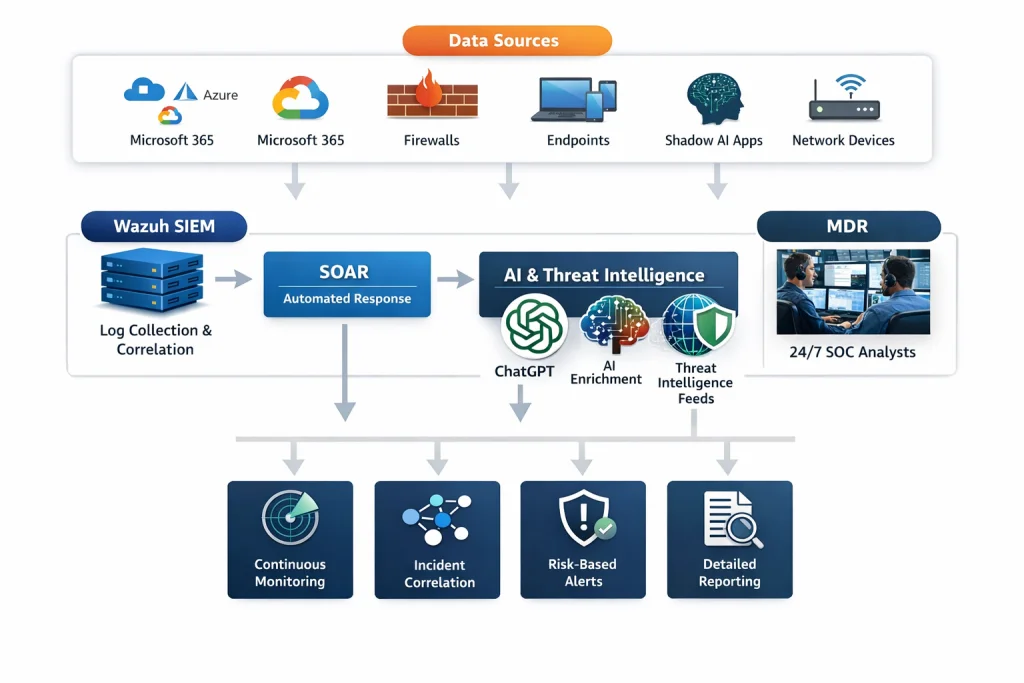
Cenova Cyber describes its security monitoring service as combining SIEM, SOAR automation, AI-assisted enrichment and 24/7 MDR analysts. Its MDR service describes analyst-led incident response and containment, including isolating infected devices and blocking malicious IPs. Ask any provider to explain which specific actions are available in your environment, and under what conditions.
WHAT SHOULD NOT BE AUTOMATED?
Speed matters, but a fast mistake can create a second incident. Mature security operations automate clear, repeatable and pre-approved steps. They escalate situations that are ambiguous or likely to affect business operations.
For example, isolating a known compromised workstation may be appropriate under a documented policy. Shutting down a production server, disabling an executive’s account or blocking a business-critical service can have serious consequences. Those choices usually need a person who understands the operational impact.
A practical division looks like this:
This is not a choice between automation and people. Automation handles the routine; analysts investigate, validate and escalate the judgment calls. Your response plan should make the boundary clear.
FOUR QUESTIONS TO ASK A MONITORING PROVIDER
When evaluating a monitoring provider, look beyond claims about “automated response.” Ask for concrete examples and written procedures.
1. Which actions are automated today?
Ask the provider to name the specific actions it can perform in your environment, not just what its platform could support in theory. Clarify whether endpoint isolation, indicator blocking, account disablement or session revocation are available, and what integrations each requires.
2. Which actions require approval?
Find out whether the provider can act immediately under pre-approved rules, needs to contact your team first, or will only recommend an action. Confirm who can approve actions after hours and what happens if that person cannot be reached.
3. Where is the authority documented?
Request an authority matrix that identifies permitted actions, approval requirements, escalation contacts and exceptions. Make sure it reflects your business-critical systems and is reviewed when your tools, staff or operations change.
4. How are actions logged and reversed?
Ask what evidence is captured: the alert, analyst review, playbook steps, timestamps, actions taken, approvals and outcome. Also ask how an action can be reversed (for example, how an isolated endpoint is safely restored) and who is responsible for that decision.
A credible provider should be able to explain how the workflow is tested, how exceptions are handled and how its team communicates with yours. “We automate response” is not enough; you need to know what happens, who authorized it and how you can verify it afterward.
AUTOMATION NEEDS VISIBILITY, INTEGRATION AND OVERSIGHT
SOAR cannot make a poor detection reliable or a disconnected security tool visible. Effective workflows depend on useful telemetry, accurate alert context, maintained integrations and clearly defined permissions. They also need testing: a playbook that works in a demonstration may behave differently when it encounters your production environment.
That is why automation works best as part of a broader monitoring capability. Cenova Cyber’s monitoring service describes a process that collects telemetry, enriches and prioritizes alerts, then brings in SOC analysts to validate and respond. The service combines SIEM, SOAR, MDR and 24/7 monitoring, with reporting intended to support operational and compliance needs.
The goal is not to automate every decision. It is to help your security team move faster on defined, authorized actions, and preserve human attention for decisions that require business context.
MAKE YOUR 3 AM RESPONSE PLAN EXPLICIT
Before choosing a monitoring provider, document the response you expect for your most important scenarios. Identify actions that can happen immediately, actions that require approval and the people who should be contacted when a decision cannot wait.
Then ask providers to walk through a realistic incident: from the first alert to containment, notification, evidence and recovery. You will learn more from that conversation than from a generic promise of “instant response.”
Contact Cenova Cyber for a monitoring consultation. We’ll discuss your environment, after-hours escalation needs and the response actions your organization is comfortable authorizing. Schedule a free security consultation and build a response plan that pairs automation with informed human oversight.