
NETWORK MANAGEMENT & MONITORING
A Reliable, Secure Network Watched Around the Clock
Cenova Cyber monitors, maintains and secures your firewalls, switches and Wi-Fi, catching problems early so your network stays fast, stable and protected.
Network monitoring and management means continuously tracking the health of your internet connection, firewalls, switches and Wi-Fi, then fixing problems, applying updates and documenting changes before your users notice anything is wrong.
A slow or unstable network costs you time and money every day. Cenova Cyber’s tools monitor your network around the clock, and our engineers act on alerts during support hours (or 24/7 with extended coverage), catching problems before they turn into outages, and keeping it secure enough to pass an audit.
Get a free consultation
Find out what’s slowing your network down and how we’d fix it, with no obligation.
Prefer to talk? Call (844) 236-6820 (844-CENOVA0).
What Are the Signs Your Network Needs Attention?
- Wi-Fi drops in the same rooms every day
- Video calls freeze or cut out
- Files take minutes to open from the server or cloud
- Nobody knows the firewall or switch passwords
- Firmware hasn’t been updated in over a year
- An outage last month had no clear cause
24/7 Automated Network Alerting
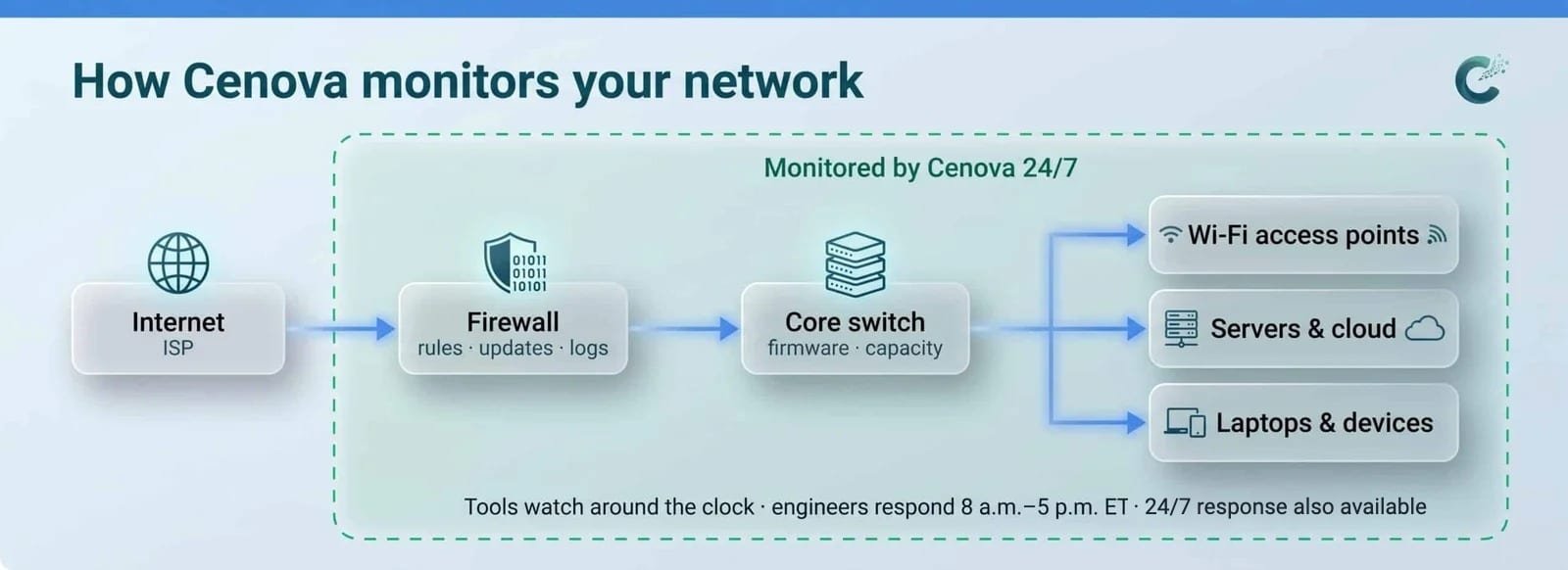
Most businesses don’t need someone changing their network every day. They need someone watching it. Cenova’s monitoring platform watches every device around the clock and automatically notifies you the moment something goes wrong: by text message, by email, and even with an automated phone call that wakes the right person up for a critical outage.
- Every firewall, switch, access point and server watched 24 hours a day.
- Instant alerts by text, email and automated phone call.
- Custom alert rules, so you only hear about what matters.
- Engineers review alerts and act on them during business hours.
Because alerting is automated, monitoring stays affordable: it’s priced per device, starting at $35 per device per month.
What’s Included in Network Management?
- 24/7 network monitoring — for LAN, WAN and Wi-Fi performance and availability, with automated 24/7 alerts by text, call and email, and engineers acting on them 8 a.m.–5 p.m. ET.
- Proactive alerting and remediation — before issues affect users.
- Firmware and patch management — for firewalls, routers, switches and access points.
- Firewall management — rules, updates and change logs documented for audits.
- Bandwidth and capacity planning — as your business grows.
- Network documentation — diagrams, device lists and credentials stored securely.
- Uptime and performance reporting — in plain English.

How Does Cenova Build Security Into Your Network?
Your network is also your first line of defense. Because Cenova is a compliance-driven MSSP, network changes are made with security controls in mind: segmented guest Wi-Fi, least-privilege access, logging that feeds our 24/7 security monitoring, and documentation that supports HIPAA, CMMC and NIST 800-171 audits.
Why Do Businesses Choose Cenova?
- NOC-style monitoring backed by a dedicated engineering team.
- Security-conscious network design that supports compliance goals.
- Fewer surprises — problems get caught before your team notices them.
- Clear reporting you can actually understand.
- 99.9% uptime.
In this space, you need someone whose opinion you can trust… Cenova will give you that.
General Counsel, Health Advocates
See what’s slowing your team down
Schedule a free consultation today and see what’s slowing your team down.
Prefer to talk? Call (844) 236-6820 (844-CENOVA0).
Frequently Asked Questions
Q1. Do you monitor our network 24/7?
Yes, our monitoring tools watch your network around the clock. Automated alerts go out 24 hours a day by text message, automated phone call and email, so the right people know right away, and Cenova engineers act on alerts from 8 a.m. to 5 p.m. ET, Monday through Friday. 24/7 engineer response is also available.
Q2. What’s the difference between network monitoring and security monitoring?
Network monitoring watches performance and availability: is it up, is it fast? Security monitoring watches for threats: is someone trying to get in? Cenova does both, and the two feed each other.
Q3. What does network management include?
Monitoring and alerting, firmware and patch updates for firewalls, routers, switches and access points, firewall rule management, capacity planning, network documentation, performance reporting, and coordination with your internet provider during outages.
Q4. Do we need new equipment?
Not always. We start by assessing what you have. If a device is end-of-life or a security risk, we explain why and give you options before recommending a replacement.
Q5. Can you manage networks across multiple offices?
Yes. We manage single sites, multi-office networks and hybrid setups with remote workers.
Q6. Will monitoring slow our network down?
No. Our monitoring tools are lightweight and non-intrusive.
Q7. Do you offer on-site network support in Tampa?
Yes. Most network issues are resolved remotely, and on-site visits are available for businesses in the Tampa Bay area, quoted separately. We don’t currently offer physical installs such as cabling.
Q8. How much does network monitoring cost?
Network monitoring is priced per device, starting at $35 per device per month. Because alerting is automated, you get 24/7 visibility without paying for a full-time network team.
Related Services
Help Desk & IT Support · Security Monitoring · Compliant Cloud & Infrastructure