File Changes Don’t Lie: How Wazuh’s FIM and MITRE-Mapped Rules Catch What Antivirus Misses
Antivirus is important, but it is not a complete record of what happens on a server. A threat may use legitimate tools, alter a configuration file, or place a webshell where an application can run it. If a security tool does not recognize the file or behavior as malicious, it may not raise a clear alert.
File integrity monitoring (FIM) adds another layer: it helps you see when monitored files change. With Wazuh, teams can combine those file-change events with host logs, detection rules, and MITRE ATT&CK context, then investigate the activity as a sequence, not an isolated alert.
SEE THE CHANGES THAT MATTER
Wazuh FIM monitors selected files and directories, comparing their current state with a stored baseline. Depending on configuration, it can report file creation, modification, or deletion, along with relevant attributes such as file permissions and cryptographic hashes. Scans can run on a schedule, and configured paths can be monitored in real time.
That evidence can be useful when an attacker, or an unexpected administrative change, affects a critical part of a system. Examples include:
- A new script appearing in a web application directory.
- A system binary or application file being modified.
- A configuration change weakening a security control.
- A suspicious file being removed after an intrusion.
FIM does not automatically prove that a change is malicious. Software updates, deployments, and routine administration also change files. Its value is that it gives an investigator a record of the change: which monitored path was affected, what attributes changed, and when the event was observed.
Coverage depends on configuration. Teams need to select meaningful paths, choose appropriate scan settings, and account for expected changes. FIM is most useful when alerts are tuned to the systems and files that matter to the organization.
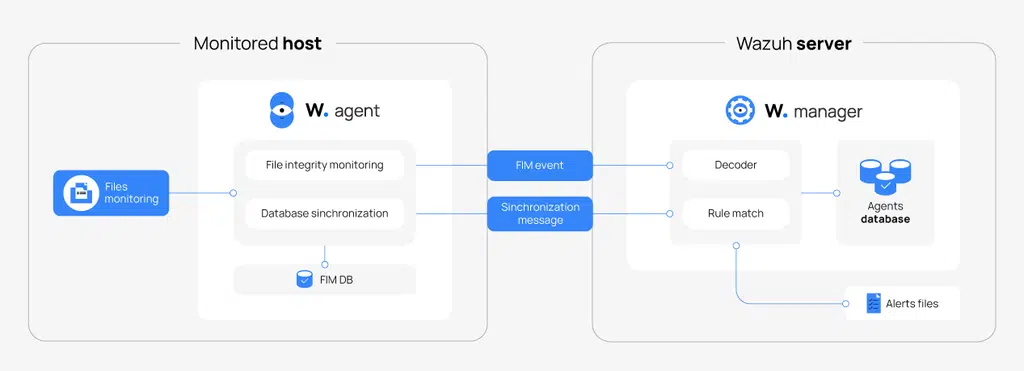
Wazuh documents FIM as a comparison of monitored files against stored checksums and attributes. See how FIM works.
USE RULES TO TURN CHANGES INTO DETECTIONS
A file-change alert provides a signal. Detection rules add conditions and context to help determine which signals deserve attention.
Wazuh includes rules that analyze incoming events, and teams can create custom rules to reflect their environment. For example, Wazuh’s documentation demonstrates FIM rules that look for newly created or modified web-script files and, in a more specific rule, suspicious webshell-related content. Those rules can map alerts to MITRE ATT&CK techniques, including webshell-related technique T1505.003.
Custom rules can be maintained in local_rules.xml. This allows security teams to add organization-specific logic without treating every change as equally important. A rule might focus on an especially sensitive directory, a set of unexpected file extensions, or changes that occur outside an approved maintenance window. The exact conditions should be tested against normal activity to reduce noise.
MITRE ATT&CK mapping gives alerts a shared vocabulary for describing adversary behavior. Wazuh’s dashboard can display mapped alerts by tactics and techniques, helping analysts explore observed activity and review where alerts are appearing. But a mapped technique is not proof of complete coverage, and a dashboard view does not mean every technique is being detected. It is an analytical aid, not a guarantee.
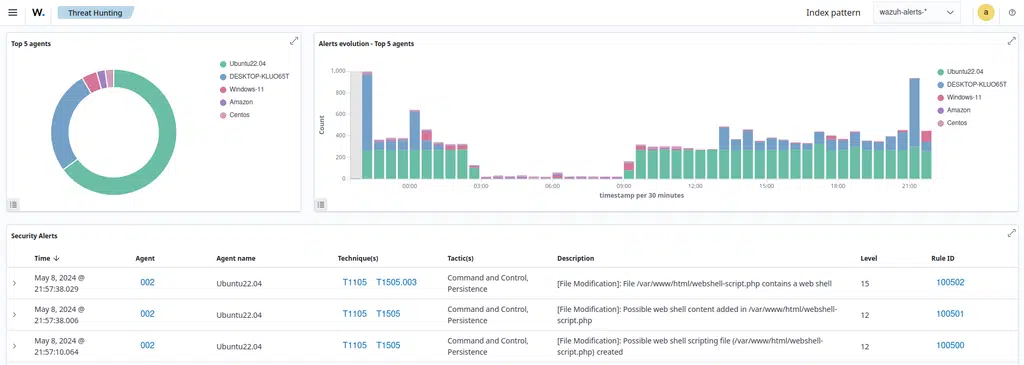
Wazuh’s FIM rules can alert on file creation or modification patterns associated with possible webshell activity. Review the documented example.
WALK THROUGH A WEBshell SCENARIO
Consider a web server where an attacker manages to place a webshell in a monitored application directory. A webshell is a malicious script that can provide a way to issue commands through a compromised web application.
First, FIM sees the file change. If the relevant directory is monitored, Wazuh can report that a new file appeared or an existing file changed. A tuned rule could flag the path, extension, or other indicators as suspicious. The alert gives an analyst a concrete starting point: the affected host and file.
Next, host logs may reveal related activity. Wazuh agents can collect configured logs from supported sources. If suitable operating-system auditing or process-monitoring telemetry is enabled and collected, those events may help show whether a web-server account launched an unexpected process. That visibility depends on the host’s logging configuration; it should not be assumed to happen automatically for every process on every endpoint.
Then, the analyst checks nearby changes. A configuration change, such as an unexpected modification to application settings, may appear as another FIM event if that file is monitored. The analyst can compare timestamps, affected paths, account details, and relevant logs to determine whether the events form a plausible attack sequence.
A single file alert may have a benign explanation. A new script, unusual process activity, and an unexplained configuration change on the same server create a stronger reason to investigate. Correlation adds context; it does not replace validation. Analysts still need to confirm what happened and decide on containment and recovery actions.
MAP WHAT YOU SEE, AND KEEP THE CONTEXT
Wazuh provides an out-of-the-box MITRE ATT&CK module that maps Wazuh alerts to tactics and techniques. Analysts can use it to filter and explore mapped events, see which monitored endpoints produced them, and examine alert details. Custom rules can also include ATT&CK technique IDs when the behavior being detected justifies the mapping.
The key is to use the framework as a lens, not a scorecard. A technique appearing in an alert describes the behavior associated with that rule; it does not, by itself, tell you the full intent or impact of an incident. Combine it with asset importance, event details, threat intelligence, and evidence from other sources.
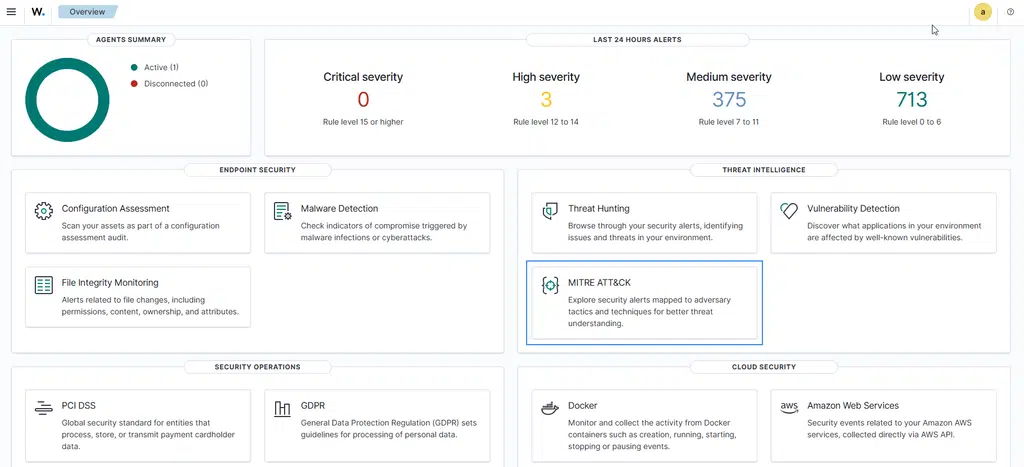
The Wazuh MITRE ATT&CK module helps teams explore mapped alerts and activity. Read about the dashboard and its views.
KNOW WHAT SOFTWARE IS EXPOSED
File changes are only part of host detection. Wazuh also uses agent-reported software inventory for vulnerability detection. The agent’s Syscollector module gathers information about the operating system and installed packages or applications. Wazuh then correlates that inventory with vulnerability information from its Cyber Threat Intelligence platform.
This connects findings to the software actually reported on monitored endpoints. Teams can review which hosts have packages whose versions fall within a known CVE’s affected range and use that information to prioritize investigation and remediation. Vulnerability findings complement FIM alerts; they answer a different question. FIM helps show what changed. Vulnerability detection helps identify known software weaknesses on inventoried systems.
Inventory and vulnerability results still need operational follow-through. Verify affected assets, assess exposure and business impact, and coordinate patching or other mitigation. A detected CVE is a useful lead, not evidence that the vulnerability has been exploited.
BUILD A LAYERED DETECTION STRATEGY
Wazuh can provide valuable host-level telemetry: file changes, configured system and application logs, software inventory, and related alerts. But no single tool sees everything. Host telemetry should complement network detection, identity monitoring, cloud visibility, and endpoint protection.
Antivirus and endpoint protection remain important controls. FIM adds a different kind of evidence: a view of changes to selected files and directories, including cases where the change itself merits investigation even if another tool does not classify it as malware. Strong detection comes from combining those signals and assigning people to review and act on them.
Cenova Cyber’s security monitoring service uses Wazuh for centralized telemetry as part of a broader monitoring platform. Our SOC combines technology with 24/7 analyst review to investigate, validate, and contextualize alerts, so your team can focus on real risk rather than sorting every event alone.
PUT HOST TELEMETRY TO WORK
A FIM alert is most useful when it points to a meaningful change, connects to relevant activity, and reaches an analyst who can determine what to do next. That requires thoughtful monitoring scope, tuned detection rules, useful log sources, and ongoing review.
Contact Cenova Cyber to discuss Wazuh-powered security monitoring. Schedule a free security consultation and learn how 24/7 analyst review can help turn host events into actionable security decisions.